What is SUNO AI? Before we get into the Suno...
Read More

What is SUNO AI? Before we get into the Suno...
Read More
My Unfiltered, Hilarious Interview with ChatGPT Artificial intelligence is smart,...
Read More
If you’re building a new website or looking to switch...
Read More
Before we get into the Suno AI Cheatsheet, it’s important to understand what SUNO AI is.
SUNO AI is an advanced AI music generation platform that lets you create original songs simply by typing text prompts. From melodies to full vocal performances, it understands lyrical structure, genre styles, and emotional tones — giving creators a near-limitless playground for music production.
The beauty of SUNO lies in its simplicity: you describe what you want, and the AI composes it — vocals, instruments, and mood all included. Whether you’re an artist, songwriter, or just experimenting with AI, SUNO turns ideas into sound in minutes.
While SUNO gives you creative control, it’s important to understand how you can use your AI-generated music. SUNO allows personal and creative use of your songs, but commercial rights may depend on the platform’s evolving terms. Always check their official licensing policy before distributing or monetizing your tracks, especially if they’re used in public projects, social media ads, or streaming platforms.
In short: You can freely experiment, but verify the license before publishing or selling SUNO-generated content.
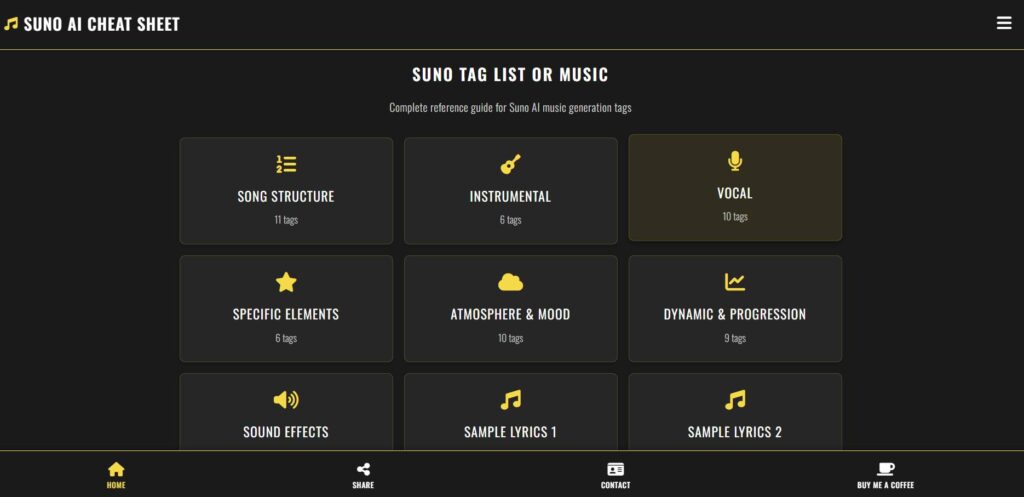
To help creators get the most out of SUNO’s prompt system, we’ve built the Suno AI Cheatsheet — an interactive tool that organizes and explains every known SUNO tag in one clean, easy-to-navigate interface.
Each tag helps SUNO understand your musical intent better — from structuring the song to shaping its tone and energy.
The tool lets you:
Here’s how the Suno AI Cheatsheet organizes the tags for quick learning and inspiration:
[intro], [verse], [bridge], or [outro] to shape your song’s flow.[guitar riff], [drum solo], or [piano melody].[male vocal], [female harmony], or [choir chorus].[ambient pad], [distorted bass], or [808 kick].[dreamy vibe], [dark tone], or [uplifting energy].[slow build], [energetic drop], or [fade out].[rain fx], [city sounds], or [vinyl crackle].Each tag acts as a creative nudge rather than a guaranteed formula. They might not always yield perfect results — but they significantly influence SUNO’s interpretation of your prompt and can make your outputs far more refined.
If you’ve ever struggled to find the right balance between structure and creativity in AI-generated music, this tool is your shortcut. Instead of guessing which prompts work, you get a well-organized reference that saves time and inspires experimentation. The interface is clean, interactive, and fast, letting you explore, copy, and test tags instantly. Even better, you’ll find real-world lyric samples that show exactly how tags enhance context and rhythm in SUNO. Whether you’re making Lofi beats, pop songs, cinematic scores, or ambient backgrounds, the SUNO Cheatsheet can level up your workflow instantly.
The Suno Cheatsheet is completely free to use, but if it helps you create better music or saves your time, you can show appreciation by clicking the “Buy Me a Coffee” button on the website. Your support keeps the project running, regularly updated, and helps us discover even more hidden tags to add.
AI music is evolving fast — and tools like the Suno Cheatsheet are here to make that creative process smoother, smarter, and more fun. So go ahead, visit suno.webto.in, explore the tags, and start shaping your next AI-powered song. Because when creativity meets good structure, music happens effortlessly.